Why Is Dedicated Hardware Essential for OpenClaw Setups in 2026?
The Shift Toward Local-First AI Autonomy
The world of artificial intelligence faces a big change. Businesses move quickly from central cloud services to local AI tools. They do this to keep data private and control their workflows. OpenClaw shows this change well. It gives groups full say over their auto tasks. But to keep this freedom, your local setup must handle all the computing load for steady AI thinking.
The Hidden Costs of Inadequate Infrastructure
Software can improve only so much without a strong base in hardware. Running auto agents needs systems to stay on all the time. They must avoid heat limits or memory issues. Weak setups cause real problems. They lead to:
-
Bottlenecked response times during complex queries and API calls.
-
Frequent system crashes due to memory overflow when handling multiple agents.
-
Corrupted data loops in the agent’s persistent memory.
To keep systems ready and stop these expensive stops, buying top hardware for OpenClaw is now a must. It forms the basic need for business-level auto work.
What Are the Baseline OpenClaw Hardware Requirements?
Decoding the RAM Bottleneck for AI Agents
Memory stands as the main limit when setting up local AI. It sets the size of the context area. It also decides how many tasks an agent can run at once.
Minimum Memory Needs for Basic Testing
For first setup and simple work tests, you need steady memory. Even small jobs call for Error-Correcting Code (ECC) RAM. This stops quiet data errors. It keeps short-term thinking correct over long-term test times.
High-Capacity RAM for Multi-Agent Workflows
When growing to many-agent setups, memory needs rise fast. Hard, side-by-side workflows require quick data paths. This avoids big system blocks.
⭐ Top Component Pick: Samsung M321RAGA0B20-CWK DDR5
⭐ Key Strengths: Providing a massive 128GB of capacity at a speed of 4800 Mbps, this module ensures your AI infrastructure has the necessary bandwidth to operate smoothly during intensive reasoning tasks.
CPU vs. GPU: Balancing Compute Power
The CPU works as the main guide for AI agents. Jobs with logic paths, many API calls, and back auto scripts depend on many cores. This stops delays in task lines. But for running large language models on site, adding top pro graphics cards helps. They bring needed VRAM and tensor cores. This speeds up model runs and cuts wait times a lot.
Persistent Storage Needs for AI Memory
A key trait of advanced AI agents is their ability to hold long-term memory. This steady record of talks and data links needs big and fast storage.
⭐ Top Component Pick: Seagate ST16000NM004J Enterprise HDD
⭐ Key Strengths: Offering 16TB of massive capacity, a 7200 RPM rotational speed, and a 256MB cache, this enterprise drive guarantees that historical AI data can be retrieved instantly without stalling thought processes.
Top 5 OpenClaw Servers 2026: Best Hardware Comparison by Use Case
When looking at top hardware picks, judging servers by real business needs works best. This way helps find the right OpenClaw setup for you.
1. The High-Performance Powerhouse for Large Enterprises
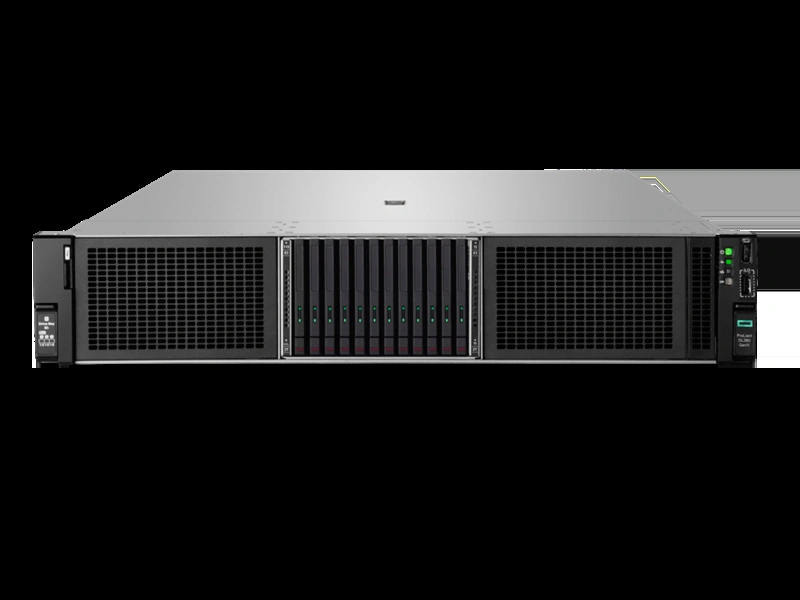
Big groups that run many AI jobs at once need full power. The Huaying Hengtong HPE ProLiant DL380 Gen11 acts as a strong base for these needs. It holds two 4th or 5th-generation Intel Xeon processors. It also allows for big DDR5 memory growth. This two-socket build keeps the main work steady in large AI control.
2. The Cost-Effective Workhorse for Small Teams
New teams often deal with tight budgets. But they still need a solid local AI space. 1U rack servers offer a good mix of price and work level. They stay small and use little power. Yet they handle key daily agent jobs well. This makes them a fine start for tests and first setups.
3. The High-Density Memory Server for Complex Workflows
If your AI agents must take in and check huge file sets, the amount of memory matters most. Server builds that hold up to 1TB of RAM over many paths give plenty of space for big context areas. This ends memory blocks in multi-job runs.
4. The Secure Enclave Server for Sensitive Data
Fields with strict rules, like money and health care, must run AI in safe spots. Servers with hardware trust roots and cut-off network ports stop wrong entry at the base and software levels. This keeps private data fully apart.
5. The Maximum Scalability Server for Future-Proofing
AI models grow at a fast pace. The Huaying Hengtong Dell PowerEdge R750 is built with wide PCIe expansion options. This lets groups add more speed tools or fast network links later. Such a growth-ready build saves your first IT spend from early out-of-date issues.
How to Ensure a Smooth Procurement Process for AI Servers?
Aligning Hardware Specs with Your Concurrency Needs
Before buying, map your team size to the daily AI job count clearly. Businesses should not just go for the top specs. Rather, fit the server level to your real side-by-side run needs and future growth. This keeps your IT spend smart.
Streamlining IT Procurement with Huaying Hengtong
Buying and setting up business AI hardware needs a steady supply line. At Huaying Hengtong, we handle a wide range of items. This includes many servers, switches, and storage from top global names like DELL, HPE, Lenovo, Inspur, and Huawei. We do not make the hardware. But we offer full, tuned IT fixes. From a focus on buyer needs, we use our deep field know-how in need checks, gear picks, and net setups. This makes sure you get real, strong setups to back your AI goals with trust.
FAQ
Q: What are the minimum hardware requirements for OpenClaw setups in 2026?
A: For basic testing and single-agent tasks, deploying a system with at least 16GB of ECC RAM and a multi-core processor is necessary. However, to ensure smooth performance without bottlenecks in a production environment, starting with 32GB of high-speed memory and enterprise-grade NVMe storage is highly recommended.
Q: Why do OpenClaw setups require so much RAM to function smoothly?
A: Local AI agents need to load entire language models into memory while simultaneously maintaining an active context window for ongoing tasks. If the memory is insufficient, the system will crash or slow down significantly, which is why developers heavily rely on high-capacity memory modules for professional deployments.
Q: How do I choose the best server for an OpenClaw setup?
A: The choice depends entirely on your team size and concurrency needs. Small teams can operate efficiently on single-socket 1U servers, while enterprise environments should invest in highly scalable dual-socket systems with massive PCIe expansion slots to handle heavy AI workloads effectively.
Q: Can I run OpenClaw setups safely on my local network without data leaks?
A: Yes, keeping the deployment local is inherently more secure than relying on cloud APIs. To maximize security, ensure your hardware features silicon-level firmware protection, keep your management ports isolated behind secure switches, and implement strict internal access controls.
Q: Does storage speed affect OpenClaw setups and AI memory retention?
A: Absolutely. AI agents constantly read and write log files and retrieve historical data from their persistent memory banks. Using high-capacity, low-latency enterprise drives prevents data transfer bottlenecks from slowing down the agent’s response times during complex logical queries.