OpenClaw’s quick rise in use has created a worldwide shortage of hardware. This issue focuses mainly on the Mac Mini M4. Many AI fans first turn to the Apple setup. Yet, the idea that it works only on Macs is just a limiting story. By 2026, AI agents will shift from test projects to key business tools. Experts now find that solid ways to set up OpenClaw often come from x86 systems such as Windows and Linux.
The 2026 OpenClaw Hardware Shift: Why Users are Moving Beyond the Mac Mini
Is the Mac Mini M4 the Only Option for 24/7 AI Agents?
The recent scarcity of high-RAM Mac Mini configurations has left many developers in a lurch. While the M4 chip is efficient, the fixed architecture of Apple Silicon means that if you need to upgrade your memory from 16GB to 64GB six months later, you are forced to buy an entirely new machine. This “modularity gap” is a significant hurdle for enterprises that require long-term scalability.
Furthermore, thermal stability remains a concern for compact mini-PCs running heavy browser automation tasks 24/7. When an AI agent is navigating complex DOM structures or processing video streams through OpenClaw, the heat generated can lead to thermal throttling. This is leading a massive wave of users to reconsider the x86 architecture, where airflow and modular upgrades are part of the core design.
OpenClaw is Platform-Agnostic: The Power of Node.js and Docker
From a technical standpoint, OpenClaw is built on Node.js 22+ and TypeScript, making it natively compatible with any modern operating system. Whether you are running Windows 11 with WSL2 or a headless Ubuntu server, the deployment process is nearly identical. The performance myths surrounding macOS “unified memory” are often overstated for agentic workflows, which are frequently more dependent on raw I/O and stable multi-threading than on a specific chip architecture.
Top Enterprise Hardware Alternatives for OpenClaw Deployment
High-Performance Workstations: The Best “Local Power” Substitute
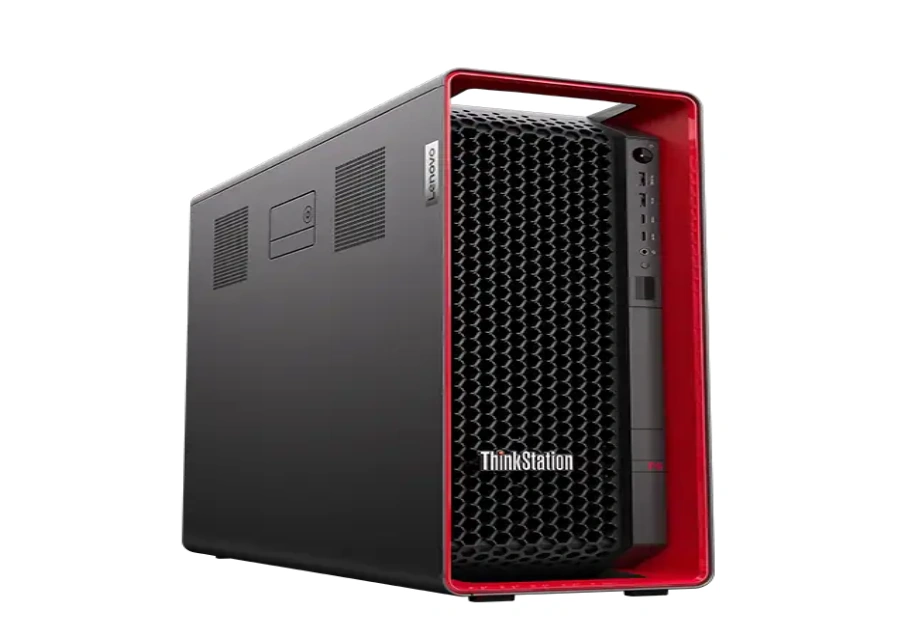
For those who want a local node with far more power than a Mac Mini, professional workstations are the gold standard. We recommend looking at the Lenovo ThinkStation P8 or P5 series. These machines are engineered for the AI era, supporting professional GPUs like the NVIDIA RTX 6000 Ada Generation.
By utilizing a professional workstation, you can host local LLMs via Ollama alongside your OpenClaw gateway without the performance degradation typically seen on consumer-grade hardware. The ability to swap out components ensures that your infrastructure grows as your AI needs evolve.
Enterprise Servers: Scaling from Single Agents to Private AI Clouds
When individual agents turn into team-wide orchestration, consumer hardware fails. This is where enterprise servers like the HPE ProLiant DL380 Gen11 or the Dell PowerEdge R650 become essential. These rack-mount solutions offer redundant power supplies and advanced cooling systems that are literally designed for 24/7 mission-critical uptime.
At Huaying Hengtong, we specialize in configuring these servers with high-density Samsung RDIMM ECC memory, such as the 64GB DDR5 modules (Part No: M321R8GA0BB0). Error Correction Code (ECC) memory is vital for AI agents that stay online for months; it prevents the silent data corruption that causes “ghosting” or sudden agent crashes in standard PCs.
Cloud VPS and Hybrid Models: Fast Deployment vs. Local Control
While Cloud VPS providers offer rapid setup, the long-term Total Cost of Ownership (TCO) can be staggering for “always-on” AI agents. A high-spec instance on Azure or AWS can cost more in annual subscription fees than the one-time purchase of a dedicated local node. Additionally, for sensitive B2B data handling, an on-premise server ensures that your AI interactions remain within your private network, far from public cloud shared instances.
The “OpenClaw-Ready” Hardware Checklist: What Specs Truly Matter?
RAM & CPU: Preventing System Crashes During Multi-Step Tasks
Running OpenClaw with multiple active channels requires a significant memory floor. While 16GB might get you started, 32GB or 64GB is the real-world baseline for 2026. We prioritize Samsung enterprise-grade memory because of its legendary stability. Pairing high RAM with a capable CPU, such as the Intel Xeon Gold 6240R with its 24.75MB L3 cache, ensures that your gateway handles high-concurrency tasks without latency.
Storage and I/O: Speeding Up Agentic Reasoning
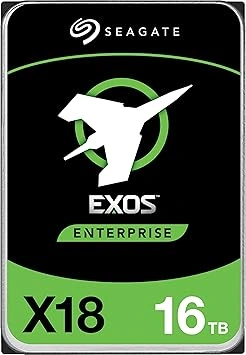
AI agents generate massive amounts of logs and session data. To ensure rapid reasoning, you must use NVMe SSDs. We recommend the Seagate Exos series, specifically models like the ST16000NM004J for bulk storage or their enterprise NVMe lineups for the primary boot drive. These drives offer high Total Bytes Written (TBW) ratings, meaning they can handle the constant read/write cycles of an active AI agent for years without failure.
Step-by-Step: Deploying OpenClaw on Windows, Linux, and Cloud
Windows Deployment: Leveraging WSL2 on Professional Workstations
For developers on Windows 11, the most efficient method is to use the Windows Subsystem for Linux (WSL2). After ensuring your Lenovo ThinkStation or Dell Precision is updated, you can install Ubuntu 24.04 from the Microsoft Store. From there, simply install Node.js 22 and run the official initialization command: openclaw onboard. This setup allows you to use familiar Windows-based UI tools while keeping the heavy lifting in a native Linux kernel.
Linux Server Deployment: Headless 24/7 Operations on Physical Nodes
For a true “set and forget” deployment on a physical HPE ProLiant server, a headless Ubuntu 24.04 or 26.04 installation is preferred. We suggest setting up the OpenClaw Gateway as a systemd daemon. This ensures that if the server reboots after a power update, the agentic gateway restarts automatically without manual intervention.
Cloud & VPS Deployment: Rapid Setup and Network Hardening
If you choose a cloud path, deploying via Docker Compose is the cleanest method to maintain environment isolation. However, security is paramount. Always configure SSH Tunneling and use strict firewall rules to ensure the OpenClaw Dashboard is only accessible through encrypted channels.
Huaying Hengtong: Engineering Your Professional AI Foundation
We at Huaying Hengtong know hardware forms the base of AI progress. From 2016 on, we have worked hard on top IT setups. We focus on selling and supporting brands like DELL, HPE, and Lenovo. You might want a rack Dell PowerEdge R750. Or perhaps Samsung server memory upgrades for your current group. We offer custom plans for your exact setup goals. We aim to make your shift from the Mac Mini smooth and pro-level. It will last into the years ahead.
FAQ
Q: How can I run OpenClaw on Windows without a Mac Mini?
A: Running OpenClaw on Windows is straightforward with WSL2 (Windows Subsystem for Linux). Install a Linux version like Ubuntu on your Windows station. Then set up Node.js 22. This lets you place the OpenClaw gateway in a natural way. For work settings, try a Lenovo ThinkStation P8. It handles back tasks without slowdowns.
Q: Is it possible to deploy OpenClaw on a Linux server for permanent uptime?
A: Yes, Linux works best for all-day runs. Place it on a real server like the Dell PowerEdge R650. Make the OpenClaw process a systemd daemon. This keeps the agent going forever. Such an arrangement beats a home Mac Mini for business jobs.
Q: What is the most reliable hardware for OpenClaw without a Mac Mini?
A: Business servers and stations give the strongest options for reliability. Take the HPE ProLiant DL380 Gen11. Add Samsung RDIMM ECC memory and Seagate Exos business drives. They bring the backups and toughness for steady AI agent work.
Q: Does cloud deployment for OpenClaw offer better security than local nodes?
A: Local setups usually give better safety for key B2B data. You control the hardware in person. Cloud services like AWS have safety tools. But a local server from Huaying Hengtong keeps API keys and logs in your own setup. They never go out.
Q: Is it possible to deploy OpenClaw on a VPS instead of a Mac Mini?
A: Yes, use Docker Compose on a VPS for a fast start. It’s a solid entry if local gear is missing. But for ongoing needs, VPS fees add up. They often top the price of a set local station or server.