


M393A2K40DB2-CVF works only with servers that support the same memory technology. These servers must also match the electrical type, speed class, rank organization, and population rules. A good fit should support DDR4 ECC RDIMM memory. It needs to handle 16GB 1Rx4 modules. The system must follow a DDR4-2933 operating profile.
How Do You Know If M393A2K40DB2-CVF Is Compatible With a Server?
Check Whether the Server Supports DDR4 ECC RDIMM Memory
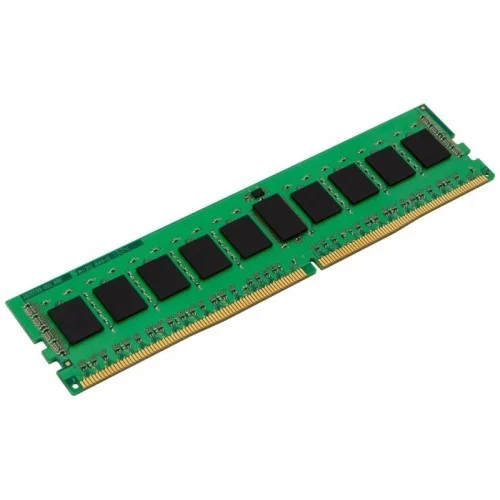
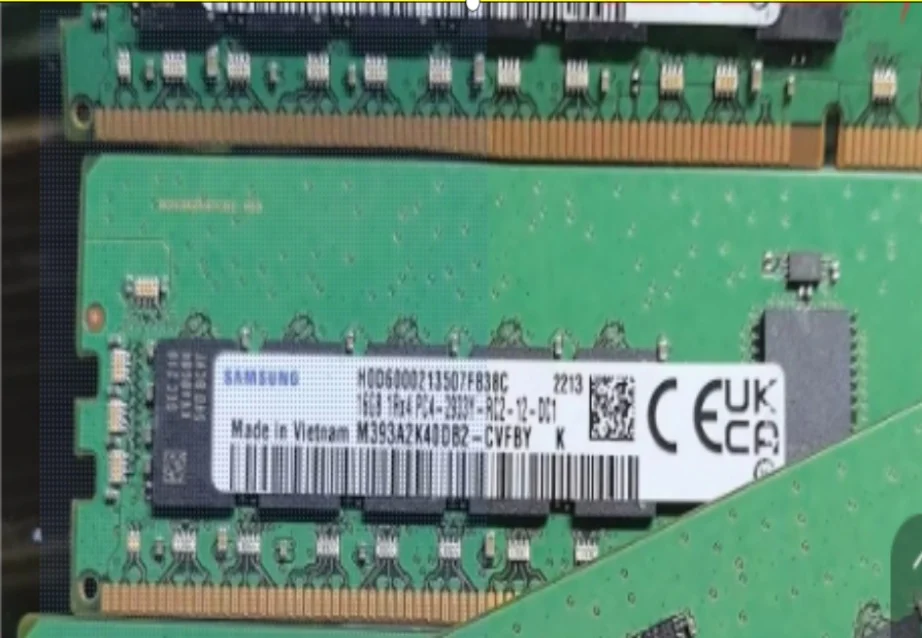
Start with the exact memory class. Do not focus only on the slot shape. The M393A2K40DB2-CVF exact replacement is a Samsung server memory module. It is listed as a 16GB DDR4-2933 ECC Registered DIMM. This module fits server platforms that require a 288-pin, 1.2V RDIMM. Its approved specification set includes 16GB capacity, DDR4-2933, ECC RDIMM, CL21, 1.2V, 1Rx4 organization, and a single-rank x4 architecture based on a (2G x 4) x 18 component layout.
Physical fit is only the first checkpoint. DDR4 UDIMM, RDIMM, and LRDIMM modules may look similar. Yet the memory controller sees different electrical behavior. Physical fit does not equal electrical compatibility. Electrical compatibility does not equal validated compatibility.
Check CPU Generation and Maximum Supported Memory Speed
DDR4-2933 server memory depends on the CPU memory controller. A server family may support 2933 MT/s RDIMM configurations. At the same time, a lower processor SKU in the same chassis limits speed to 2666 MT/s or another supported rate. Check the processor generation first. This step avoids assuming the rated speed will always apply.
Verify Capacity, Rank, and DIMM Population Requirements
M393A2K40DB2-CVF should be treated as an exact server-memory BOM item. It is more than a generic 16GB DDR4 DIMM. Verify 16GB RDIMM support. Confirm single-rank 1Rx4 support. Check DIMM population rules, channel layout, and CPU socket configuration.
Which Servers Are Most Likely to Support M393A2K40DB2-CVF?
Servers With DDR4-2933 ECC RDIMM Support
The strongest candidates have DDR4 architecture. They offer ECC Registered DIMM support. These systems provide 2933 MT/s memory support. They support 16 GB RDIMM capacity. The CPU generation must support DDR4-2933. Models to investigate commonly include Dell PowerEdge R640, R740, and R740xd. Other options are HPE ProLiant DL360 Gen10 and DL380 Gen10. Lenovo ThinkSystem SR630 and SR650 also belong on the list.
This list is a shortlist. It is not a full certification. For the HPE ProLiant DL380 Gen10, approved configuration fields include first- to second-generation Intel Xeon Scalable processors. The platform supports up to 205W CPU TDP. It has 24 DDR4 DIMM slots. Memory fields cover 2666/2933 MHz. The system allows RDIMM/LRDIMM support. Those fields support platform-level DDR4-2933 RDIMM suitability. Yet they do not prove that every DL380 Gen10 CPU, BIOS level, slot population, or installed-memory mix supports M393A2K40DB2-CVF as an exact qualified part.
Why the Server Model Alone Cannot Confirm Compatibility
“R740 supports DDR4-2933 RDIMM” is not the same as “every R740 configuration supports this exact DIMM in every slot.” The final server memory compatibility check still needs the installed CPU. It also depends on BIOS version, existing modules, populated slots, DIMMs per channel, and OEM qualification lists.
Why Might M393A2K40DB2-CVF Run Below 2933 MT/s?
CPU Memory Limits Can Lower the Operating Speed
Rated speed and operating speed are different. The module’s actual operating speed can depend on the host server’s processor generation. It also relies on memory channels, BIOS level, and DIMM population rules. If the CPU supports only a lower memory data rate, then M393A2K40DB2-CVF may downclock. This outcome is not automatically a compatibility failure. It may be the correct negotiated speed for that configuration.
DIMM Population Can Affect Memory Frequency
DIMM population rules matter. Each memory channel has electrical loading limits. A 1DPC configuration may allow a higher rate than 2DPC in the same platform. Dual CPU servers also need balanced channels across both processors. Follow the official population sequence.
Mixed Memory Speeds Usually Follow the Slowest DIMM
If an existing server uses slower DDR4 RDIMMs, a new 2933 MT/s RDIMM may run at the lower common speed. That situation often answers why a 2933 server RAM runs at 2666. A downclocked but stable DIMM can still be compatible. An unsupported DIMM type may prevent boot.
Can M393A2K40DB2-CVF Be Mixed With Existing Server Memory?
Do Not Mix RDIMM With Incompatible DIMM Types
First, identify whether the installed modules are RDIMM, LRDIMM, or UDIMM. M393A2K40DB2-CVF is an ECC RDIMM. The existing memory type must align with the server vendor’s mixing rules. The fact that two modules are DDR4 does not make them interchangeable.
Match Capacity, Rank, and Speed Where Possible
Compare the current DIMM part number. Look at installed capacity, speed, rank, x4 or x8 organization, and manufacturer part number. Exact replacement or upgrade planning should verify the full part number. It must check rank organization, DDR4-2933 speed class, ECC RDIMM type, label information, existing memory population, and server qualification rules before deployment.
Keep Memory Channels Balanced Across CPUs
In a dual-CPU server, memory attached to CPU 1 and CPU 2 should follow the platform’s channel balance rules. Uneven placement can reduce bandwidth. It may also create health warnings even when each module is individually valid.
How Can You Verify M393A2K40DB2-CVF Compatibility Before Buying?
Identify the Exact Server and Processor Configuration
Use a procurement path of server model, CPU model, DDR generation, DIMM type, supported speed, rank support, and capacity support. Do not send only “Dell R740” or “DL380 Gen10” to a supplier.
Check Existing DIMM Specifications and Available Slots
Record the current DIMM part number. Note installed capacity, speed, rank, occupied slots, and available slots. You can gather this data through BIOS/UEFI, iDRAC, iLO, XClarity, or operating system tools. Huaying Hengtong covers Dell, HP, Super Fusion, IBM, Lenovo, Huawei, Inspur, and other brands. Its business involves PCs, servers, switches, accessories, workstations, storage, and other hardware and software equipment. Our server hardware category is a practical starting point for platform matching.
Compare the Configuration With the Server Memory Guide
Check the official memory guide. Review the population table, QVL/HCL, and OEM qualification list where required. Final approval of a server memory BOM still requires the exact part number. It needs the manufacturer configuration guide, QVL/HCL, approved compatibility matrix, and installation test records.
Verify the System After Installation
After installation, verify total recognized capacity. Check actual operating speed, DIMM health, POST warnings, event logs, and channel balance.
How Huaying Hengtong Supports M393A2K40DB2-CVF Server Memory Sourcing
Compatibility Checks Before Server Memory Procurement
Huaying Hengtong has industry experience in demand analysis, technical verification, equipment selection, network implementation, quality assurance, operations and maintenance, and service support. Those capabilities can be applied to server BOM procurement. The process includes organizing requirements, checking component evidence, coordinating configurations, and verifying delivered systems. For M393A2K40DB2-CVF sourcing, we can support enterprise buyers with product sourcing, specification matching, and configuration communication.
Server Memory Supply for Upgrades and Bulk Deployment
For single-server upgrades or bulk deployment, the safest process is part number verification. It continues with quantity planning, configuration matching, and after-sales support. Huaying Hengtong can help buyers compare the exact DIMM requirement with the memory module category while keeping the final compatibility decision tied to manufacturer guides and system validation.
FAQ
Q: What server specifications are required for M393A2K40DB2-CVF compatibility?
A: The server should support DDR4 ECC RDIMM memory, 16GB capacity, 1Rx4 organization, DDR4-2933 speed class, compatible CPU memory controller, and the required DIMM population rules.
Q: Which servers can support M393A2K40DB2-CVF DDR4 RDIMM memory?
A: DDR4-2933 ECC RDIMM platforms such as Dell PowerEdge R640/R740/R740xd, HPE ProLiant DL360 Gen10/DL380 Gen10, and Lenovo ThinkSystem SR630/SR650 are likely candidates. Each exact configuration still needs verification.
Q: Can M393A2K40DB2-CVF run at 2933 MT/s in every compatible server?
A: No. A compatible server may run the module below 2933 MT/s if the installed CPU, BIOS, memory population, or mixed DIMM set limits the operating speed.
Q: Can M393A2K40DB2-CVF be mixed with other DDR4 RDIMMs?
A: It may be possible only when the server vendor’s rules allow the same DIMM type, compatible rank, supported capacity, acceptable speed mix, and correct channel population.
Q: How can I check M393A2K40DB2-CVF compatibility before installation?
A: Confirm the exact server model, CPU SKU, existing DIMM part numbers, slot population, official memory guide, QVL/HCL status, and post-installation health data before treating the upgrade as complete.