The Great IT Dilemma: OEM vs. Retail Enterprise Storage
What Does “Lenovo-Branded” Actually Mean for a Seagate Drive?
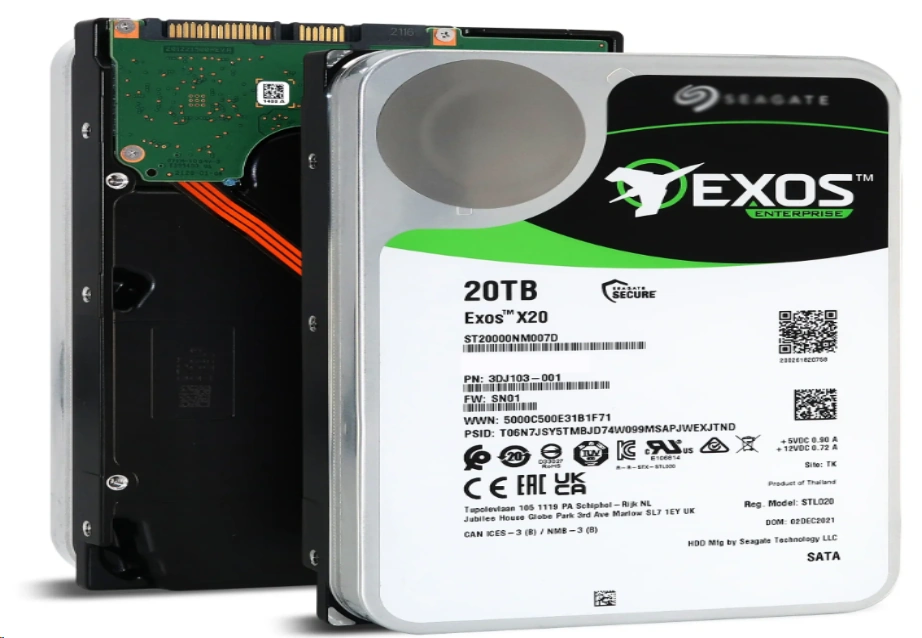
When expanding the storage capacity of data centers or high-end workstations, IT procurement personnel face a classic dilemma: purchasing Original Equipment Manufacturer (OEM) drives with a system brand’s label or buying the retail equivalent directly from the storage manufacturer. In the Lenovo vs. Seagate enterprise drives debate, it is an open secret in the IT hardware industry that major system brands do not manufacture their own hard drive platters. A Lenovo-branded enterprise drive is often physically identical to a retail Seagate drive, utilizing the exact same magnetic recording technology. For example, when scaling up the storage of a flagship Lenovo ThinkStation P8 workstation, which boasts a breakthrough computer architecture with enhanced cooling, administrators often wonder if an official OEM drive differs from a retail Seagate ST20000NM007D. The ST20000NM007D is a 20TB high-capacity hard drive designed for enterprise applications with a SATA 6Gb/s interface and 7200RPM speed. The core differences lie solely in the branding, the customized firmware, and the subsequent price markup.
The Hidden Costs of Choosing the Wrong Enterprise Storage Strategy
Procurement decisions based purely on upfront unit costs can lead to unexpected operational bottlenecks. If an organization opts for the cheapest retail drives without understanding ecosystem requirements, it might face integration hurdles. Conversely, blindly paying the OEM premium for every single storage tier can drain the IT budget rapidly, limiting the ability to scale overall infrastructure and invest in other critical hardware upgrades.
Firmware and Compatibility: Does the Lenovo Label Make a Difference?
Exploring Custom Firmware: Performance Boost or Vendor Lock-In?
OEM drives come loaded with custom firmware requested by the system manufacturer. This tailored programming ensures the drive communicates flawlessly with specific RAID controllers and motherboard thermal sensors. While this optimization offers genuine stability for highly specific hardware ecosystems, it also creates a form of vendor lock-in. IT departments are often forced to pay higher prices for future replacements simply to maintain this strict firmware harmony when evaluating Lenovo vs. Seagate compatibility.
“Uncertified Drive” Warnings: Fact or Fiction in Lenovo Systems?
System administrators frequently worry about hardware rejection when bypassing OEM parts. Inserting a retail drive into certain strict environments might trigger an “uncertified drive” warning in the system logs or cause cooling fans to run at maximum speed due to unrecognized thermal data. However, for many standard storage arrays and scalable workstations, high-tier retail drives are recognized and function perfectly. For instance, deploying the Seagate ST4000NM000B—a 4TB drive featuring 7200 RPM high speed and equipped with a 256MB large cache —can deliver continuous read and write speeds up to 261MB/s. When integrated correctly, the amber warning light remains a manageable software nuance rather than a critical physical failure.
Warranty, SLAs, and Downtime: Analyzing the True Total Cost of Ownership (TCO)
The Convenience of Single-Vendor Support
Navigating Next Business Day (NBD) Replacements
The primary justification for the OEM premium is the Service Level Agreement (SLA). With an OEM-branded drive, the storage component is covered under the entire system’s warranty, often guaranteeing a Next Business Day onsite replacement by a certified technician.
Eliminating the Blame Game in IT Support
When a RAID array degrades, dealing with a single vendor eliminates the frustrating “blame game.” IT teams avoid scenarios where the system manufacturer blames the hard drive, and the hard drive manufacturer blames the system’s backplane.
The Cost-Saving Power of Direct Manufacturer Warranties
Understanding the Standard RMA Process
Retail drives rely on the manufacturer’s direct warranty. If a retail drive fails, the IT team must diagnose the issue, remove the drive, and initiate a standard Return Merchandise Authorization (RMA) process directly with the manufacturer.
Calculating the ROI on Spare Drive Inventories
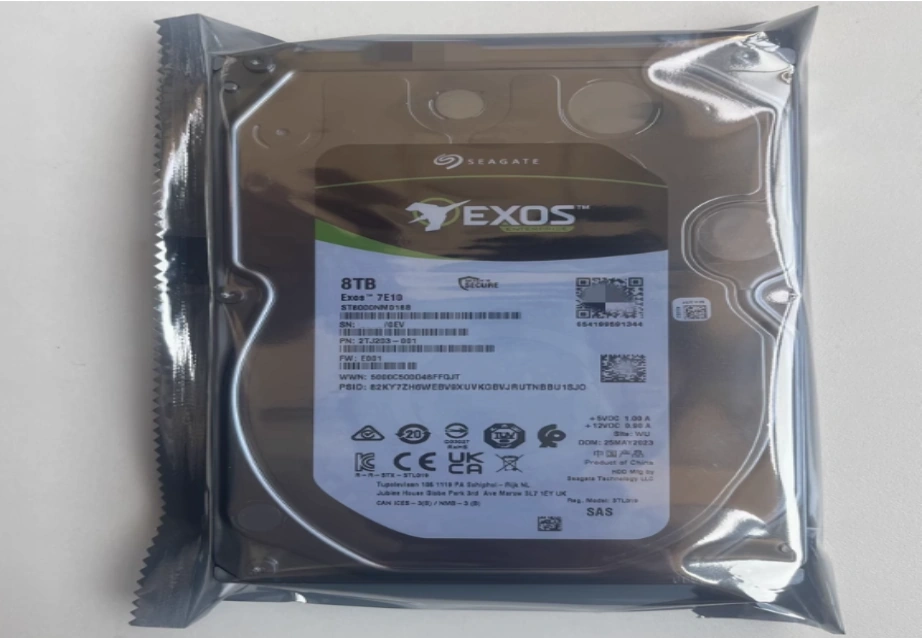
Because retail drives are significantly more cost-effective, many IT architects use the financial savings to purchase cold spares. For example, maintaining an on-site inventory of the Seagate ST8000NM018B, an 8TB high-performance hard drive featuring CMR vertical magnetic recording technology, allows for immediate redundancy management. By keeping these extra drives on-site, a failed drive can be replaced in minutes, effectively negating the need for an expensive on-site warranty for non-critical storage tiers.
Strategic Procurement: When Should You Buy Lenovo, and When Is Seagate Better?
Scenarios Where the OEM Premium is Absolutely Essential
For mission-critical core databases, strict compliance environments, and edge computing nodes where immediate onsite support is legally mandated, paying the OEM premium is a necessary insurance policy. In these scenarios, the seamless integration of firmware and unified technical support outweighs the initial hardware costs.
High-Volume Deployments Where Retail Seagate Drives Win
For massive scale-out NAS, secondary backup repositories, and bulk expansions, retail drives are the clear winner. Utilizing the Seagate ST16000NM004J, which has a large storage capacity of 16TB and uses the SAS 12Gbps interface to provide high-speed data transmission, delivers massive, reliable data throughput. It uses advanced helium sealing technology to increase storage density and reduce power consumption, making it an ideal choice for data centers without the extreme markup of an OEM label.
How Huaying Hengtong Can Optimize Your Enterprise Storage Setup
Bridging the Gap Between OEM Reliability and Retail Pricing
At Huaying Hengtong, we were established in 2016 and are mainly engaged in the sales and service of IT products. We have accumulated rich industry experience in demand analysis, technical verification, equipment selection, network implementation, quality assurance, operation and maintenance, and service support. We are determined to build our company into an excellent IT service provider in China. Whether an infrastructure requires the strict compliance of OEM-labeled drives or the aggressive cost-efficiency of retail storage components, we navigate the global supply chain to deliver the exact hardware needed.
Tailored Hardware Solutions for Your Unique Infrastructure
We operate a rich product line with a wide coverage, involving PC, server, switch, accessories, workstation, storage, and other hardware and software equipment. If an enterprise requires a powerhouse like the Lenovo ThinkStation PX, a flagship workstation for professional computing and high-end graphics processing design, we can supply the optimal system configurations. We provide robust hardware, ensuring the right blend of premium workstations and cost-effective retail storage components to maximize infrastructure ROI.
FAQ
Q: Is there a performance difference in the Lenovo vs. Seagate enterprise drives debate?
A: Physically, the magnetic platters and mechanical components are virtually identical. The primary difference lies in custom firmware optimizations that OEM drives possess to interface flawlessly with specific RAID controllers, though raw read/write speeds remain largely the same.
Q: Will choosing retail drives in a Lenovo vs. Seagate comparison void the system warranty?
A: Using third-party retail drives generally does not void the warranty of the server chassis or the motherboard itself. However, the retail drives will not be covered under the system’s service agreement, and support teams may ask for uncertified components to be removed during complex troubleshooting.
Q: For bulk storage, which side of the Lenovo vs. Seagate choice is more cost-effective?
A: Retail drives are significantly more cost-effective for bulk storage. By purchasing models like the 16TB Seagate ST16000NM004J directly, IT departments can save a massive portion of their budget compared to buying the exact same capacity with an OEM label.
Q: Why do warning lights appear when testing Lenovo vs. Seagate retail compatibility?
A: System management platforms are programmed to look for specific OEM firmware signatures. If a retail drive lacks this signature, the system may flag it as an “uncertified drive” and trigger an amber warning light or increase fan speeds, even if the drive functions perfectly.
Q: In a Lenovo vs. Seagate deployment, how does the replacement process differ?
A: With an OEM drive, the reliance is on the system manufacturer’s service level agreement, which often includes next-business-day onsite replacement. With a retail drive, the IT team must handle the replacement using cold spares and initiate a standard RMA process directly with the hardware manufacturer.