


Replacing a failed enterprise hard drive is not a simple capacity match. Drives with the same connector and size may behave differently when a RAID controller checks sector geometry, firmware identity, usable blocks, or carrier electronics. Treat compatibility as a chain: record the installed hardware, identify the full storage path, eliminate mismatches in order, and only then compare price or availability.
Start With the Failed Drive and the Host Platform
Capture the Existing Drive Identity and Array State
Photograph the failed drive label. Record the full model and part number, interface, capacity, form factor, speed, sector notation, firmware, and tray number. If management software still reads the disk, export its logical and physical block sizes and total block count; a suffix difference may identify another interface or format.
Also capture RAID level, member count, controller slot, hot-spare policy, failed bay, and virtual-disk state. Do not test an unverified drive when redundancy is exhausted. Preserve controller logs and a current backup first.
Identify the Server, Backplane, Controller, and Firmware Baseline
Compatibility belongs to the whole path: server generation, cage, backplane, cable or expander, controller, firmware, BIOS, and operating system. Check the installed configuration because optional components change what similar servers accept.
Existing server portfolios illustrate why these details cannot be collapsed into a single “supports enterprise HDDs” label. Some systems expose onboard SATA RAID, optional SAS/SATA array cards, tri-mode controllers, and separate NVMe options. Drive-bay layouts may range from 2.5-inch SFF to 3.5-inch LFF and differ across front, middle, and rear cages. The installed controller and physical data path—not the chassis marketing name—determine which replacement can be used.
Match SAS or SATA, Form Factor, and the Drive Carrier
Treat Interface Compatibility as a Controller-and-Backplane Decision
Start with the existing interface. A SAS drive needs a SAS-capable path; a SATA-only controller cannot operate it. Some SAS paths accept SATA media, but firmware, dual-port expectations, error handling, RAID policy, or support status may still rule out that substitution.
Controller choice changes what the same bay can accept. Cached platform data distinguishes onboard SATA RAID, optional SAS/SATA array cards, and tri-mode controllers. A chassis advertised for both SAS and SATA therefore does not prove that every installed controller, cable path, firmware release, or RAID level supports the proposed replacement. Inventory the actual controller model rather than relying on the server family’s maximum configuration.
Check SFF/LFF Size, Tray Generation, LEDs, and Hot-Swap Support
Match 2.5-inch SFF or 3.5-inch LFF dimensions, then verify the carrier separately. Tray generation can affect screw position, interposers, latch depth, presence detection, LEDs, and controller communication.
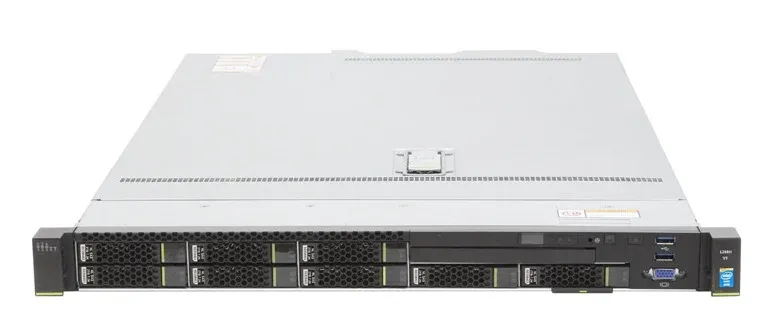
The knowledge base records platforms that support up to 38 2.5-inch SATA/SAS disks or 20 3.5-inch SATA/SAS disks across front, middle, and rear positions. Those layouts show why form factor, cage position, backplane type, and tray generation must be checked for the exact chassis. A 2.5-inch drive can still fail the mechanical check if the carrier, interposer, latch depth, connector position, or LED mapping belongs to another generation.
Hot-swap is a system feature. Confirm that the bay, controller, RAID configuration, and procedure support online replacement; otherwise schedule a controlled shutdown.
Confirm 512e/4Kn and Firmware Compatibility
Match Logical and Physical Sector Formats to the Existing RAID Policy
Sector labels describe host behavior. A 512n drive uses native 512-byte sectors; 512e stores data in 4K physical sectors but exposes 512-byte logical sectors; 4Kn exposes native 4K logical sectors. The formats are not interchangeable merely because two use 4K physical media.
Match the format approved for the controller and array. Older firmware, boot modes, drivers, or operating systems may reject 4Kn. Reformatting is model-specific and destructive, so never treat it as a universal workaround.
Verify Firmware Identity, Telemetry, and the Supported Update Path
Compare firmware family and platform part identification. Firmware can affect timeouts, error recovery, queue behavior, thermal reporting, predictive alerts, and update delivery even when two drives share similar hardware.
Platform knowledge also links storage management to digitally signed firmware packages and system lockdown. That makes drive firmware identity, supported update paths, telemetry, and predictive alerts operational compatibility checks rather than warranty details. A drive may spin, enumerate, and even rebuild while still producing unsupported status messages or losing health reporting.
Protect the RAID Rebuild From Hidden Mismatches
Compare Usable Block Count, Capacity Floor, and Recording Technology
A replacement must report at least as many usable blocks as the failed member. Equal advertised capacity can hide a smaller block count that prevents rebuilding, so use controller-reported capacity. After compatibility is established, enterprise HDD capacity planning can address growth and workload economics.
Confirm recording technology, workload rating, speed, sustained transfer behavior, cache policy, and power requirements. Performance similarity never substitutes for controller approval.
Avoid Unsupported Mixing of Sector Formats, Interfaces, and Performance Classes
The safest degraded-array replacement matches interface, logical sector size, capacity floor, and validated firmware policy. Mixed performance classes can constrain the array, while mixed interfaces may alter error recovery or multipath behavior. Follow the controller’s policy.
Verify Foreign Configuration, Rebuild State, and Controller Logs
After insertion, confirm the disk appears in the expected bay and review any foreign configuration before acting. Monitor the correct rebuild, temperature, medium errors, predictive alerts, unsupported-drive warnings, and link resets. Visibility alone is not success; wait for a completed rebuild and healthy consistency check.
Use a Pre-Purchase Enterprise HDD Compatibility Checklist
Compare Verified SAS and SATA Candidates Without Assuming Compatibility
A product page supplies screening fields, not blanket compatibility. The ST1800MM0129 1.8TB SAS enterprise HDD is listed with SAS 12Gb/s, 10,000 RPM, 256MB cache, and a 2.5-inch form factor. Its sector format, firmware, carrier, and controller validation still need confirmation.
For every candidate, record interface, form factor, usable capacity, sector format, firmware family, tray, controller support, warranty, and workload rating.
Record the Evidence and Confirm the Exact Platform Match
Huaying Hengtong’s knowledge base covers varied controller and bay layouts, including onboard SATA RAID, optional tri-mode storage, and mixed SFF/LFF configurations. We use that platform context to help customers collect the original drive label, controller model, chassis generation, firmware baseline, tray photos, sector format, and RAID state before matching a replacement. Our recommendation remains conditional until those fields are verified.
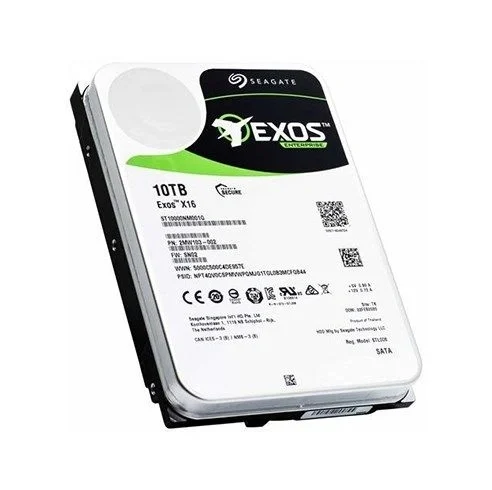
The ST8000NM017B 8TB SATA enterprise HDD is listed with SATA 6Gb/s, 7,200 RPM, 256MB cache, and a 3.5-inch form factor. It can be a valid SATA candidate yet remain unsuitable for a specific SAS array, 4Kn policy, carrier, or firmware whitelist. Send the evidence before ordering.
FAQ
Q: Can a SATA enterprise HDD replace a SAS drive?
A: Only when the installed controller, backplane, firmware, and RAID policy explicitly support SATA in that bay and array. A compatible connector is not enough, and a SATA replacement may change performance, error handling, or support status.
Q: Can 512e and 4Kn enterprise drives be mixed in the same RAID array?
A: Often they cannot. Logical sector sizes must match the controller and array policy. Check the exact controller documentation and existing member format rather than assuming all drives with 4K physical sectors are compatible.
Q: Does a replacement enterprise HDD need the same firmware?
A: Not always the identical revision, but it needs a supported firmware family and update path. Confirm platform identification, telemetry, error recovery, predictive alerts, and warranty implications before installation.
Q: Can an existing enterprise HDD tray or caddy be reused?
A: Reuse it only after checking form factor, screw positions, connector alignment, interposer, latch depth, LEDs, and carrier generation. A tray that holds the drive may still fail presence detection or status reporting.
Q: Should an enterprise HDD replacement have the same capacity and RPM?
A: It must meet the controller’s usable-block minimum and should match the array’s performance class when practical. Equal advertised capacity does not guarantee equal block count, while a slower drive can limit rebuild and array performance.