The field of data storage has changed greatly as we step into 2026. A basic talk about speed in the past has grown into an important choice. This choice includes power savings, data volume, and ongoing dependability.
Storage Technology Basics: What is a Hard Disk Drive (HDD)?
Hard Disk Drives represent the legacy and the ongoing backbone of mass data storage. They operate using a mechanical arm with a read/write head that moves across rotating magnetic platters. This physical movement is what defines the “seek time” and the distinctive mechanical sound of the drive.
Definition and Physical Structure of HDDs
Inside an HDD, data is stored magnetically. The speed of rotation, measured in Revolutions Per Minute (RPM), directly affects how fast data can be accessed. While consumer drives often hover at 5400 RPM, enterprise environments demand more precision and speed.
Enterprise-Grade HDD Technical Standards
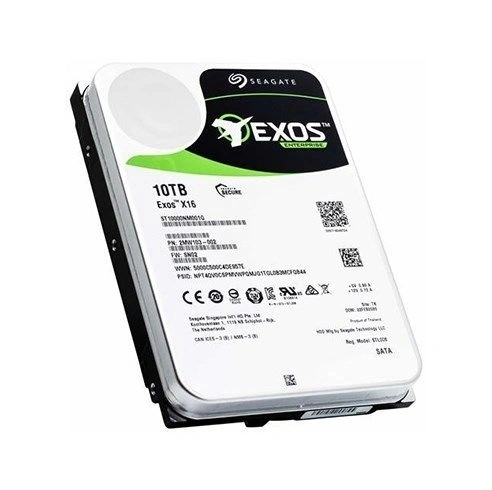
In the enterprise sector, the 7200 RPM standard remains the gold requirement for performance-oriented mechanical storage. These drives often utilize advanced interfaces and rotational vibration safeguards—such as the enterprise-class design found on the Seagate ST10000NM002G—to handle higher command queuing and bi-directional data flow far better than standard consumer SATA alternatives.
The Role of HDDs in the 2026 Market
Even though flash has grown, HDDs cannot be swapped out for dense, cheap “cold” storage. When a company has to keep petabytes of old data or watch footage, the space-to-price balance of a mechanical drive still stands out.
Storage Technology Innovation: What is a Solid State Drive (SSD)?
Solid State Drives have changed computing boundaries by ending the slowdown from mechanical motion. SSDs skip magnetic platters. Instead, they rely on NAND flash memory. This acts as a web of electric cells that holds data at once.
How SSDs Work: NAND Flash Technology
Without moving parts, SSDs gain almost no delay. This plays a big role in 2026 tasks like AI training and live data reviews. In those, each tiny wait means lost income.
Interface Evolution: From SATA to NVMe
We have noted the change from SATA SSDs to NVMe (Non-Volatile Memory Express) technology. It now serves as the norm for very quick storage layers. Large HDDs like the Western Digital WUH721816ALE6L4 make use of firm SATA 6Gb/s links for dependable mass storage. Modern SSDs, on the other hand, draw on PCIe growth lines to boost data transfer speeds a great deal for busy tasks.
Why SSDs are the Standard for High-Performance Computing
SSD technology counts as a must now for any vital task. In areas like Virtual Desktop Infrastructure (VDI) or fast databases, the large flow of current flash storage makes sure the CPU never sits idle waiting for data.
Mechanism Comparison: How Do HDDs and SSDs Store Data?
The basic gap rests in how these tools locate the data you want.
Magnetic Seek vs. Electronic Reading
When you request a file on an HDD, the disk must rotate to the correct position and the arm must move to the correct track—this is “seek time.” An SSD, however, identifies the location electronically. This allows an SSD to be significantly faster at “random access” tasks, such as booting an operating system or launching many small files at once.
Wear and Tear Mechanisms During Data Writing
HDDs face mechanical wear; the arm and motor eventually degrade over millions of cycles. SSDs face a different challenge: Program/Erase (P/E) cycles. Each time data is written to a flash cell, it undergoes a tiny bit of degradation. However, modern wear-leveling algorithms have made this almost a non-issue for most enterprise users.
HDD vs SSD: 5 Core Differences Defining Performance
Quick Reference: HDD vs SSD Comparison Table
| Feature | Hard Disk Drive (HDD) | Solid State Drive (SSD) |
| Primary Mechanism | Mechanical (Platters/Heads) | Electronic (Flash Memory) |
| Relative Speed | Slower (Limited by RPM) | Extremely Fast (NVMe/PCIe) |
| Typical Capacity | Very High (Up to 20TB+) | High (Growing quickly) |
| Durability | Sensitive to vibration/drops | Highly shock-resistant |
| Power Efficiency | Higher consumption (Motor) | Lower consumption (Electronic) |
Read/Write Speeds and IOPS
The Input/Output Operations Per Second (IOPS) for an SSD can reach hundreds of thousands. A usual HDD often delivers lower random read speeds. Still, for step-by-step data work, large drives like the 20TB Seagate ST20000NM007D using CMR (Conventional Magnetic Recording) technology bring strong steadiness and usefulness. This fits big data handling, cloud data centers, and business backup and recovery.
Reliability and Environmental Adaptability
HDDs can break if the server shifts or shakes while in use. That said, strong-output business models have advanced. Drives like the ST10000NM002G include solid top-cover builds and rotational vibration (RV) sensors. These lessen inside rub and unrest. In turn, they support steadiness in dense rack setups.
Maximum Capacity and Scalability
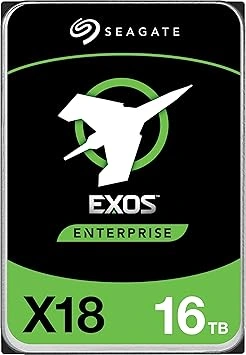
For massive data sets, HDDs still win. A single drive like the Seagate ST16000NM004J offers 16TB of capacity, making it perfect for distributed file systems, video cloud storage, medical image archiving, and massive backup arrays.
Power Consumption, Heat, and Noise Control
Because SSDs lack a motor, they generate significantly less heat and consume less power. For a massive data center, switching to SSDs can reduce cooling costs, which is a major factor in modern sustainability goals.
Economic Cost: Deep Dive into Cost Per TB
The cost per terabyte remains the strongest argument for HDDs. While SSD prices have fallen, they still carry a premium. For archival storage where speed is secondary, the budget efficiency of a mechanical drive is unmatched.
2026 Purchasing Guide: Making the Best Decision Based on Business Scenarios
Picking the right drive goes beyond checking specs. It needs a partner who knows network setup and quality checks. At Huaying Hengtong, we draw on our over ten years of growth know-how and set sales paths to guide your gear picks. We make sure your hardware spend comes with pro need reviews and tech checks. By matching your storage options to exact tasks, you can boost both output and trustworthiness.
B2B Scenarios for High-Capacity HDDs
For medium-to-large video watch or cold data backup, we strongly suggest the ST10000NM002G. Its 10TB large storage area and better cache handling offer the precise trustworthiness and steady data speeds required for nonstop 24/7 old file work. This comes without straining the IT funds.
Why Mission-Critical Servers and VDI Require SSDs
Current business handling and databases need the quickness that only NVMe brings. Drawing on a server frame built for these tasks ensures you gain full use of PCIe 5.0 speeds. This brings the delay down to the microsecond mark.
Hybrid Storage Solutions: Balancing Speed and Budget
Most of Huayinghengtong’s clients do well with a layered method: SSDs for the operating system and fast databases, and large HDDs for the main data storage. We have supplied custom info tech fixes for varied fields. These include government offices, finance, military, and health care. So, we hold the full field know-how to aid you in carrying out this layered plan without flaws. This gives the top from both sides. Output where it matters and savings where it counts.
FAQ
Q: Why should I choose HDD over SSD for bulk data storage in 2026?
A: HDDs remain the most money-smart answer for large storage. This is true above all when output is not the top worry. For work like old storage or video watch, a large drive like the ST10000NM002G delivers a much lower cost per terabyte. At the same time, it upholds the trustworthiness needed for 24/7 business settings.
Q: What is the real speed difference in an HDD vs SSD setup for servers?
A: The gap is big. A current NVMe SSD can deal with thousands of side requests with a small delay. Yet, mechanical drives bring very firm ongoing move speeds. Take the ST6000NM019B as an example. It supplies steady read and write speeds up to 210MB/s. This guarantees quick data work for large data centers. In those, the basic IOPS count less than the space and steady flow.
Q: How does the lifespan of a modern HDD vs SSD compare under heavy workloads?
A: HDDs get measured by mechanical strength and work rates. Take the strong 550TB/year work limit for the ST16000NM004J. SSDs get measured by “Total Bytes Written” (TBW). Early SSDs showed less staying power. But now, business flash is made to endure many years under steady writes. Often, it lasts longer than the server’s life.
Q: Is the cost per TB for an HDD vs SSD narrowing enough to switch entirely?
A: The divide is shrinking, but it has not shrunk enough for a full swap in every area. For big data centers managing exabytes of data, the cost split still means a huge money outlay. We usually guide our clients at Huaying Hengtong to pick SSDs for busy tasks and HDDs for data that is seldom used.
Q: Can I mix an HDD and an SSD in a single RAID array for better performance?
A: We do not advise blending drive types in one RAID set. The setup’s output will stay tied to the slowest drive’s speed, the HDD. Rather, look at a layered storage plan. In it, the server draws on SSDs as a quick cache or a distinct “hot” layer. HDDs then fill the “cold” space layer.