What Are the Core OpenClaw RAM Requirements for 2026?
Figuring out the exact memory needs for AI agents is the key first move in setting up a strong base. OpenClaw hardware needs grow a lot based on the model’s detail level. They also depend on the size of active context areas. Getting these details right helps keep your setup affordable. It also makes sure it responds well to user inputs.
Minimum Memory Configurations for Basic Operations
For developers building initial proofs of concept, massive enterprise setups are not immediately necessary. You can begin testing local AI agents with a highly stable foundation. A module such as the Samsung M393A4K40DB3-CWE provides a solid starting point. This is a 32GB DDR4 RDIMM that operates at a speed of 3200 Mbps. It features an 8-bit parity check signal that realizes error correction. This effectively avoids data loss and system crashes, providing stable and reliable data storage for server scenarios. While this configuration handles lightweight agent interactions with smaller parameter models, scaling up your operations to handle complex autonomous reasoning will quickly consume these baseline resources.
Recommended Capacities for Enterprise-Scale AI
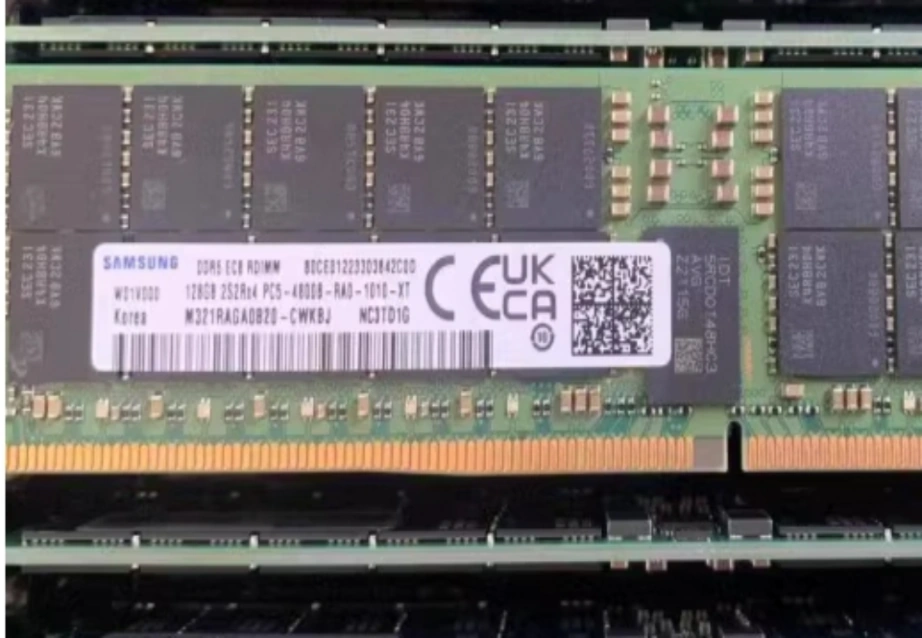
When deploying autonomous AI agents in a production environment, the OpenClaw hardware requires massive memory pools to retain context and execute complex reasoning tasks without crashing. The transition to DDR5 is mandatory for this level of performance. Integrating components like the Samsung M321RAGA0B20-CWK elevates your capacity significantly. This module offers 128GB of capacity and blazing-fast speeds of 4800 Mbps. Utilizing DDR5 technology ensures that data transmission is fast and the bandwidth is large enough to meet the relentless needs of data-intensive applications. It also introduces more effective power management technology, which improves energy efficiency for high-performance computing.
How Does OpenClaw Hardware Impact Local AI Performance?
Memory size shows just one side. The mix of your RAM, chips, and storage decides how well AI agents deal with real data flows.
The Bottleneck Effect of Insufficient Processing Power
Flooding your system with high-capacity RAM is useless if your processors cannot handle the computational throughput. OpenClaw relies heavily on parallel computing to parse instructions and generate rapid responses. Utilizing a machine like the Lenovo ThinkStation PX eliminates these processing bottlenecks. This flagship workstation supports up to two Intel Xeon Platinum 8592+ processors, each boasting 64 cores. Furthermore, it can house up to four NVIDIA RTX 6000 Ada GPUs with 48GB GDDR6 memory. This extraordinary processing power allows the system to zip through machine learning and deep learning workflows efficiently. This ensures that complex autonomous agents do not experience compute-bound latency during operations.
The Role of High-Speed Storage in Data Retrieval
Your AI models must pull enormous datasets from storage into active memory constantly. Slow storage drives force your high-speed RAM and processors to sit idle while waiting for data, drastically increasing generation times. Modern OpenClaw hardware must prioritize NVMe technology to bridge this gap. The Lenovo ThinkStation PX supports up to a 4TB M.2 NVMe PCIe SSD. Ensuring that data retrieval matches the pace of your overall compute architecture is vital. Rapid access prevents latency when autonomous agents query localized databases or parse massive documents.
Which Infrastructure Strategy Best Supports Commercial Scaling?
As your group shifts from local building to wide use, the hardware’s physical build must change to fit many users at once.
Transitioning from Consumer Workstations to Rack Servers
While workstations handle development brilliantly, hosting multiple OpenClaw instances for hundreds of users requires data center scalability. The HPE ProLiant DL380 Gen11 serves as a prime example of this transition. It is a 2U two-socket rack server based on the Intel Eagle Stream platform. This server supports up to 32 DDR5 memory modules, enabling a staggering maximum memory capacity of 8TB. This density is ideal for virtualized applications that require large-capacity storage and high memory bandwidth. This allows you to run multiple sophisticated agents simultaneously without experiencing hardware degradation.
Balancing Initial Investment with Long-Term Reliability
Business growth calls for hardware that holds up under non-stop heavy use. Putting money into tough setups cuts down on expensive stops. It guards your long-term gains. The HPE ProLiant DL380 Gen11 offers choices up to 2200W 1+1 hot-swappable redundant power supplies. These back up to 96 percent titanium efficiency. It also holds hot-swappable redundant fans to keep good working heat levels. These error-proof builds make sure your OpenClaw hardware stays up during key business tasks and company rollouts.
Why Partner with an Authorized IT Solutions Provider?
Getting top parts is just the start of a good AI rollout. Where you get your hardware and the know-how in setting it up decides your project’s lasting win.
Securing Authentic Equipment and Guaranteed Quality
Fake or side-market parts bring big dangers to business setups. We at Huaying Hengtong have worked with many brands. We can give users real standard goods from the main brand makers. We offer full original quality checks to make sure your base is safe. We stand for top brands and run a full product range with broad reach. It covers hardware and software gear like PCs, servers, switches, and storage. This wide stock makes sure your OpenClaw hardware rests on true and solid ground.
Leveraging Professional After-Sales and Maintenance Services
Making a custom AI base needs deep tech skills and ongoing watch. We have gained much field know-how in need checks, tech tests, gear picks, network builds, quality checks, run and fix, and help support. With the main idea of putting customers first, we make custom plans for them. Huaying Hengtong aims to build our firm into a top IT help provider in China. Our skilled team works hard to serve you truly. We make sure your hardware keeps working well long after the first setup.
FAQ
Q: What is the absolute minimum RAM required for basic OpenClaw hardware setups in 2026?
A: For light tests, start with a 32GB part like the Samsung M393A4K40DB3-CWE. It gives 3200 Mbps speeds and ECC error fixes. But real-level AI agents will soon need much bigger memory areas to work right without blocks.
Q: How does DDR5 memory improve OpenClaw hardware performance compared to DDR4?
A: DDR5 tech offers quicker data move speeds and wider bandwidth. That is key for data-heavy jobs. Top parts like the 128GB Samsung M321RAGA0B20-CWK run at 4800 Mbps. They keep AI models going well and steadily.
Q: Should developers invest in a workstation or a rack server for an OpenClaw hardware deployment?
A: A top station like the Lenovo ThinkStation PX fits local AI building and hard job handling. For big data center rollouts, a 2U rack server like the HPE ProLiant DL380 Gen11 gives better growth and memory depth.
Q: Why does OpenClaw hardware require high-speed NVMe storage in addition to large RAM?
A: High-speed NVMe storage ensures quick data pulls. This stops your chips and RAM from blocking while waiting for big AI data sets to load from storage in think and train steps.
Q: How can users ensure their OpenClaw hardware remains reliable under continuous AI workloads?
A: You get reliability by picking business-grade hardware and teaming with skilled IT help providers. At Huaying Hengtong, we give full original quality checks and pro tech tests to keep your systems running smoothly.