Почему необходимы аппаратные требования OpenClaw в 2026 году?
Переход к суверенным местным агентам ИИ
Экосистема искусственного интеллекта переживает радикальные изменения. Предприятия активно уходят от облачных API для развертывания суверенных местных агентов ИИ. Этот переход гарантирует, что высокочувствительные корпоративные данные остаются в пределах частной сети. Однако достижение этого уровня цифровой автономии передает огромную вычислительную нагрузку мышления ИИ непосредственно на вашу локальную серверную инфраструктуру.
Как аппаратное обеспечение напрямую диктует реактивность агента
Алгоритмы программного обеспечения, независимо от того, насколько продвинуты, строго связаны физическими ограничениями их хост-среды. Запуск автономных агентов требует систем, которые могут выполнять непрерывные, одновременные задачи без снижения скорости соединений или дросселирования. Если физические компоненты не хватают, весь рабочий процесс ИИ испытывает крайнюю задержку. Понимание точных необходимых спецификаций предотвращает узкие места времени реагирования и гарантирует, что инфраструктура может поддерживать бесперебойную работу в нескольких департаментах.
Каковы минимальные спецификации OpenClaw для базового тестирования?
Базовые компоненты для развертывания доказательства концепции
Когда ИТ-отдел только начинает оценивать локальную автоматизацию ИИ, создание среды доказательства концепции является первым логическим шагом. Для одного агента, работающего на ограниченном наборе данных, минимальная точка входа обычно включает стандартный многоядерный процессор и около 16 ГБ оперативной памяти с кодом исправления ошибок (ECC). Эта базовая конфигурация обеспечивает достаточное количество вычислительного пространства для инициализации программного обеспечения, загрузки высококвантовой языковой модели и выполнения последовательных задач с низкой сложностью.
Скрытые риски работы на минимальных порогах
Базовый уровень позволяет запустить программное обеспечение. Однако он не работает хорошо для реального использования. Бег в самой низкой точке приводит к серьезным проблемам. Когда агент пытается задать сложный вопрос или проверять большой файл, часто появляются ошибки, такие как Out-of-Memory (OOM). Кроме того, работа почти на полной мощности быстрее износит аппаратное обеспечение. Это вызывает тепловые проблемы, которые замедляют работу. Это приводит к плохому опыту для пользователей.
Каковы рекомендуемые спецификации оборудования для производства предприятий?
Оптимизация емкости памяти для сложных контекстных окон
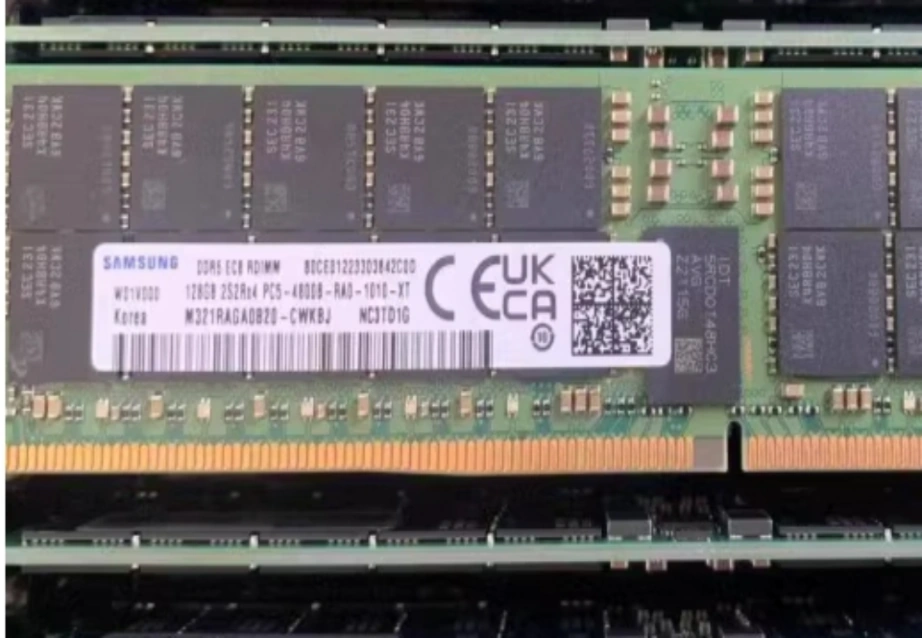
В коммерческой среде память является наиболее важным фактором для многоагентных рабочих процессов. Агентам требуется огромная высокоскоростная оперативная память, чтобы сохранять активные расширенные контекстные окна без постоянного обмена данными на жесткий диск. Для производства на предприятиях, начиная с 64 ГБ до 128 ГБ высокочастотной памяти DDR5 является стандартом. Оборудование сервера такими модулями, как Samsung M321RAGA0B20-CWK гарантирует, что одновременные процессы имеют огромную пропускную способность, необходимую для плавной работы без смертельных ограничений памяти.
Ускорение выводов с помощью передовых вычислительных мощностей
Высокоядерный процессор необходим для обработки логического маршрутизации, фоновых скриптов и управления API. Однако генерирование ответов ИИ требует тяжелых параллельных вычислений. Рекомендуемая настройка производства сочетает надежный корпоративный процессор с специализированными профессиональными графическими процессорами. Использование такой платформы, как HPE ProLiant DL380 Gen11 обеспечивает необходимые двойные розетки питания и слоты расширения PCIe для размещения передовых графических карт, резко ускоряя время выводов и уменьшая задержки очереди задач.
Использование высокоскоростного хранения для памяти постоянного агента
Изысканные агенты ИИ используют долговременную память, чтобы вспомнить прошлые разговоры. Они также имеют доступ к крупным векторным базам данных. Обычные накопители не соответствуют постоянным потребностям в чтении и записи для этих записей. Высококачественные варианты хранения, такие как Сигейт ST16000NM004J диск предприятия, обеспечить быстрый доступ к старым данным. Это останавливает небольшие паузы. Эти паузы происходят, когда ИИ достигает своего хранилища памяти.

Минимальный vs рекомендуемый: какая инфраструктура подходит вашему бизнесу?
Оценка совместимости и ежедневных объемов задач
Решение между базовым и рекомендуемым уровнями сводится к объему задачи. Небольшие команды, проводящие изолированные исследования, могут выжить на сильно оптимизированном сервере начального уровня 1U. Однако, если ваш бизнес планирует одновременно запускать десятки агентов ИИ, одновременно управляя обслуживанием клиентов, скрепингом данных и внутренней отчетностью, вы должны принять рекомендуемый корпоративный уровень, чтобы предотвратить полную блокировку сети.
Будущее защита от быстрого расширения модели ИИ
Модели ИИ с открытым исходным кодом продолжают расти по размерам и способностям. Покупка оборудования, которое только удовлетворяет текущим основным потребностям, означает, что оно скоро устареет. Инвестиции в предлагаемые спецификации помогают. Сосредоточьтесь на серверах с новыми стандартами PCIe и пространстве для обновления памяти. Таким образом, ИТ-лидеры защищают свои расходы. Они также готовятся к более сильным потребностям будущих моделей ИИ.
Как обеспечить надежную закупку аппаратного обеспечения AI Server?
Навигация в сложной цепочке поставок ИТ предприятий
Поиск реального ИТ-оборудования бизнес-уровня требует усилий. На рынке есть много вариантов с различными настройками. Выбор неправильного сочетания процессоров, памяти и сетевых инструментов может разрушить проект ИИ. Группы требуют четкого процесса покупки. Он должен подтвердить, что детали соответствуют друг другу и поставляются с реальными гарантиями.
Расширение возможностей вашей инфраструктуры с помощью Huaying Hengtong
Обеспечение правильного оборудования требует опытного партнера по цепочке поставок ИТ. В Huaying Hengtong мы специализируемся на предоставлении комплексных ИТ-решений клиентам по всему миру. Хотя мы не производим оборудование, мы управляем богатой, многобрендной линейкой продуктов, включающей аутентичные серверы, системы хранения данных и коммутаторы из всего мира. с ведущими технологическими брендами. Основываясь на нашей основной концепции ориентированности на клиента, наша команда использует обширный отраслевой опыт в выборе оборудования, чтобы помочь вам уверенно перейти от минимальных сред тестирования к полностью рекомендуемой высокопроизводительной инфраструктуре ИИ.
Часто задаваемые вопросы
Вопрос: Каковы абсолютные минимальные аппаратные требования OpenClaw для развертываний 2026 года?
Ответ: Чтобы просто запустить платформу и запустить один базовый агент для целей тестирования, вам понадобится современный многоядерный процессор и не менее 16 ГБ оперативной памяти ECC. Однако эта минимальная спецификация будет значительно затрудниваться с одновременными задачами или большими контекстными окнами.
В: Почему рекомендуемая оперативная память в аппаратных требованиях OpenClaw настолько высока?
A: Локальные агенты ИИ должны загружать полные языковые модели непосредственно в систему’ памяти, одновременно сохраняя активные рабочие пространства открытыми для постоянного мышления. Высокоемкостная оперативная память предотвращает сбой или замедление работы системы при обработке сложных многоэтапных запросов.
Вопрос: влияет ли скорость хранения на аппаратные требования OpenClaw для локальных развертываний?
О: Да, скорость хранения очень важна. Агенты ИИ постоянно читают и записывают журналы взаимодействия для сохранения постоянной памяти. Использование высокоскоростных корпоративных накопителей предотвращает узкие места передачи данных, позволяя ИИ мгновенно вспомнить исторический контекст, не вызывая задержек в рабочем процессе.
В: Как выбрать между минимальными и рекомендуемыми спецификациями для OpenClaw?
Ответ: Выбор полностью зависит от вашего ежедневного объема одновременности. Если вы самостоятельный разработчик, тестирующий базовые скрипты, минимальных спецификаций может быть достаточно. Для организаций, работающих с несколькими агентами в разных отделах круглосуточно, инвестирование в рекомендуемое оборудование корпоративного уровня является обязательным для обеспечения стабильности.
Вопрос: Могут ли стандартные настольные процессоры удовлетворять аппаратным требованиям OpenClaw для рабочих процессов ИИ?
Ответ: Стандартные настольные процессоры могут достичь базового уровня для ранних тестов. Но для текущих бизнес-задач необходимы серверные процессоры. Они предлагают множество путей PCIe, большую поддержку памяти ECC и теплоустойчивость для круглосуточных работ ИИ.