


Data center expansion planning often begins with a straightforward question: how much storage capacity will be needed next year? While this is an important starting point, capacity alone does not provide a complete planning framework. Enterprise HDD planning for 2026 should also account for rebuild times, drive interfaces, sector formats, spare-drive policies, procurement lead times, and the service-level requirements of different workloads.
Why Enterprise HDD Capacity Planning Is Changing
Higher Capacities Can Extend Rebuild Times
Higher-capacity HDDs can reduce the number of drive bays required, but they may also increase the time needed to rebuild a failed drive. A 16TB or 20TB HDD can be an efficient choice for archive and backup environments, yet the system may remain in a degraded state for longer if controller bandwidth, host I/O performance, or drive health limits rebuild speed.
For this reason, capacity planning should evaluate recovery performance alongside raw storage requirements. Rebuild duration, system load during recovery, redundancy design, and failure exposure all need to be considered when selecting drive capacities.
Data Tiering Is Changing the Storage Media Mix
Different workloads require different storage media. High-performance databases and latency-sensitive applications may be better suited to SSD or NVMe storage, while backup, object storage, surveillance, log retention, and archival workloads can continue to benefit from enterprise HDDs.
A well-structured capacity plan should therefore distinguish between active data, long-term storage, backup copies, and retention requirements. Matching each data tier with the appropriate storage technology can improve performance, capacity efficiency, and overall infrastructure cost control.
Forecast Demand Before Selecting Drive Size
Convert Workloads Into Usable Capacity
Start with application owners and convert growth into usable capacity after RAID, erasure coding, filesystem reserve, snapshots, replication, and backup retention. A drive group that looks large on a quote can become much smaller after protection overhead and spare policy are applied.
Separate steady growth from event-driven growth. Compliance retention, new camera counts, AI datasets, log expansion, and backup policy changes can each create different write patterns. A single annual percentage can hide those differences and lead to the wrong drive mix.
Add Spares, Backups, and Retention
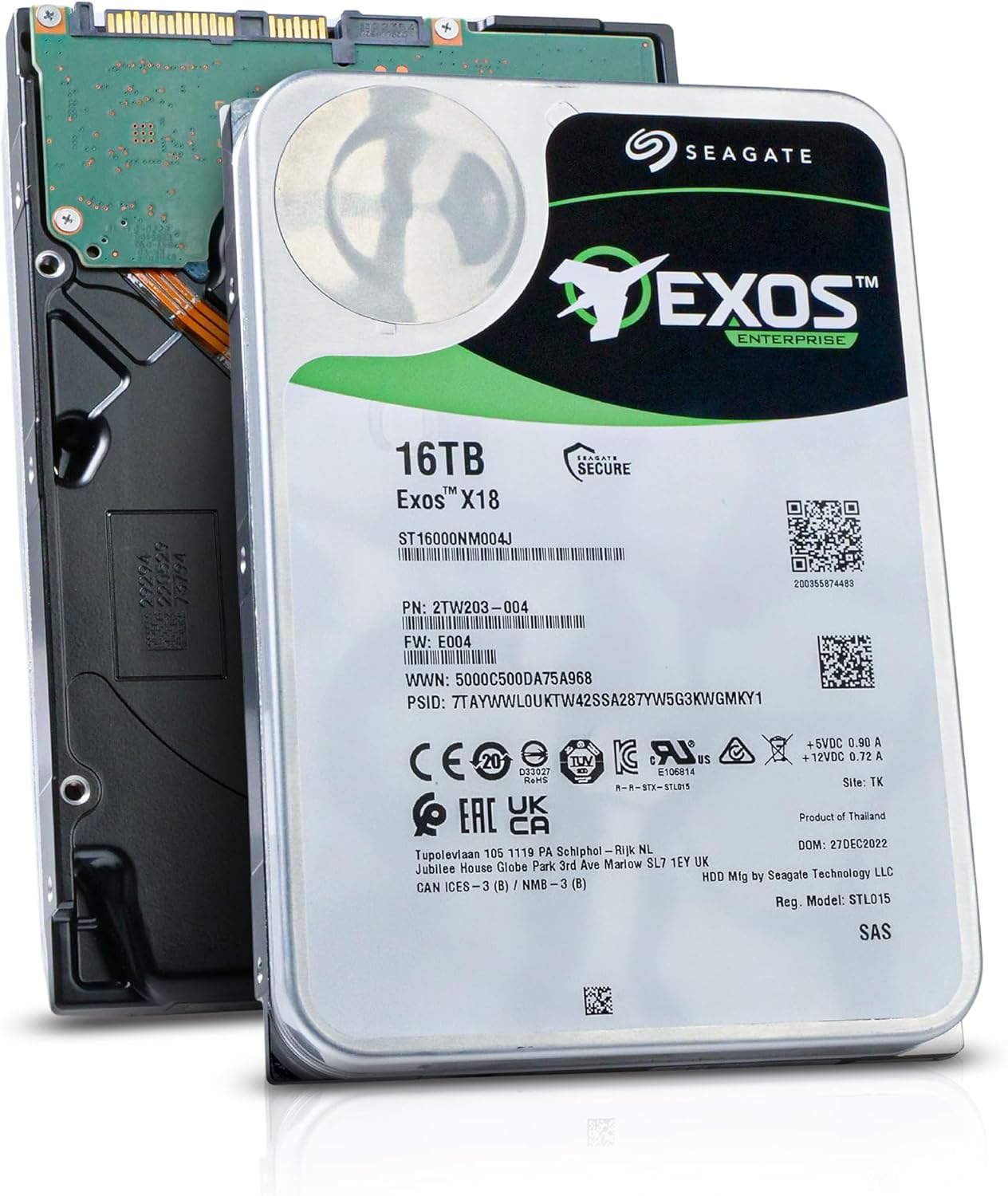
Spare drives, cold inventory, and backup targets are part of the capacity model. The Seagate ST16000NM004J 16TB enterprise HDD is a 16TB SAS 12Gbps enterprise HDD product page that can inform high-density planning, but buyers still need the installed controller, tray, firmware, and workload requirements before choosing it.
Retention should be calculated in time as well as capacity. A backup target that stores one more month of data may require more usable space, more verification time, and more restore-test capacity. Those effects should be visible before the purchase order is approved.
Match HDD Capacity to Platform Constraints
Interface, Sector Format, and RAID Policy
SAS, SATA, 512e, 4Kn, firmware identity, and usable block count can decide whether a proposed drive is accepted. The Seagate ST8000NM017B 8TB enterprise HDD is an 8TB SATA enterprise HDD option, while a SAS drive may be better for a different controller path. Equal advertised capacity does not guarantee rebuild eligibility.
Tray, Controller, and Firmware Details
Drive carrier generation, backplane, slot position, RAID controller, BIOS, and management firmware all matter. Huaying Hengtong lists enterprise hard drives, storage products, servers, and related IT hardware for data center planning. Those categories must be checked together rather than as isolated purchases.
The same capacity can behave differently when the drive sits behind a different controller or expander. A platform may accept a drive for basic visibility but still report unsupported firmware, weak telemetry, missing LED behavior, or a rebuild policy conflict. Capacity planning should therefore include an acceptance test for the exact bay and array, not only a purchasing check.
Build a 2026 Expansion Runbook
Procurement and Compatibility Evidence
Record model numbers, interface, form factor, sector format, cache, workload rating, warranty, firmware family, carrier photos, controller model, and array policy. Procurement should include alternates, but alternates must be validated against the same evidence set.
Migration, Rebuild, and Validation Windows
Capacity expansion should reserve time for backup validation, copy testing, burn-in, rebuild monitoring, and post-change integrity checks. The RAID rebuild planning guide explains why large enterprise drives change rebuild time, risk, performance, and hot spare planning. That planning should be finished before the failure event.
A practical runbook should define what happens if rebuild speed is lower than expected. It should name the owner who can reduce workload, change rebuild priority, replace a second suspect drive, or pause noncritical backup jobs. The point is not to predict every failure. It is to decide in advance which signals trigger escalation while the array is under stress.
Where Huaying Hengtong Fits in the Plan
Product Range and Technical Verification
Huaying Hengtong works across servers, hard drives, storage, network equipment, accessories, and IT services. We treat capacity planning as a compatibility and service-risk exercise, not only a cost-per-terabyte calculation. That approach helps align drive selection with platform limits and business recovery targets.
When to Use Storage Services
Use service support when the organization has mixed drive generations, multiple RAID policies, remote sites, unclear firmware baselines, or tight recovery objectives. A reviewed plan can reduce the chance that a purchased drive arrives on time but fails the controller, tray, or rebuild policy check.
Service review also helps when expansion affects more than storage. More usable capacity can increase backup windows, replication traffic, monitoring volume, and recovery-test duration. Treat those side effects as part of enterprise capacity HDD planning, because they determine whether the new capacity is actually usable during a business incident.
Часто задаваемые вопросы
Q: How should enterprise capacity HDD planning estimate usable space?
A: Enterprise capacity HDD planning should subtract RAID or erasure-coding overhead, snapshots, replication, filesystem reserve, spare policy, backup copies, and retention growth from raw drive capacity.
Q: Why do enterprise capacity HDD choices affect rebuild risk?
A: Larger drives can extend rebuild time, and rebuilds stress surviving members. Interface, controller priority, host I/O, media health, and array width all affect the degraded window.
Q: Should enterprise capacity HDD planning use SAS or SATA drives?
A: The choice depends on the controller path, performance target, cost, dual-port needs, firmware policy, and workload. A SATA drive and a SAS drive are not interchangeable by capacity alone.
Q: How many spares should enterprise capacity HDD planning include?
A: Spare quantity should reflect drive family, site count, procurement lead time, array importance, failure domains, and whether automatic or manual rebuild is preferred.
Q: What evidence should enterprise capacity HDD buyers keep?
A: Keep the drive model, interface, sector format, usable block count, firmware, carrier, controller model, RAID policy, backup status, and post-install validation records.